Blog

  • Why Generative AI Still Struggles with Citations (And How to Fix It Manually)

    Why Generative AI Still Struggles with Citations (And How to Fix It Manually)

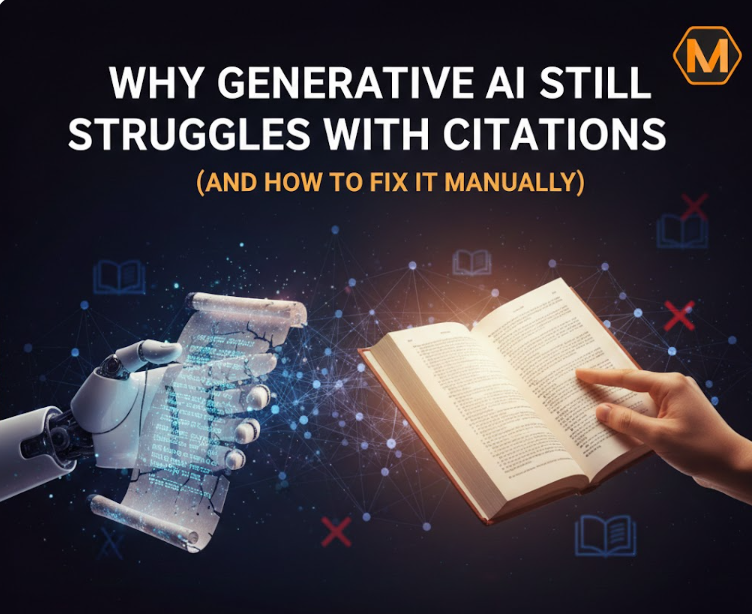
    The landscape of writing has shifted beneath our feet. Just a few years ago, the idea of a computer writing a full-length essay in seconds felt like science fiction. Today, with platforms like GravityWrite and other LLMs, it’s our daily reality. But as we lean more on these tools, a massive “trust gap” has emerged. While AI is brilliant at mimicking human language, it has a major, sometimes career-ending flaw: it is a terrible librarian. It can tell a great story, but it often struggles to tell you exactly where it got its information.

    In the world of high-stakes academics and professional blogging, a single fake reference can ruin your reputation. If you are struggling with a heavy workload and the pressure of perfect referencing, it is often much safer to seek professional Assignment help from experts like myassignmenthelp who prioritize factual integrity over automated speed. Unlike an algorithm that predicts the next likely word, human experts verify every source against real-world databases. This human touch is the only way to ensure that your bibliography isn’t just a list of “ghost sources” that don’t actually exist.

    The Science of the “Ghost Citation”

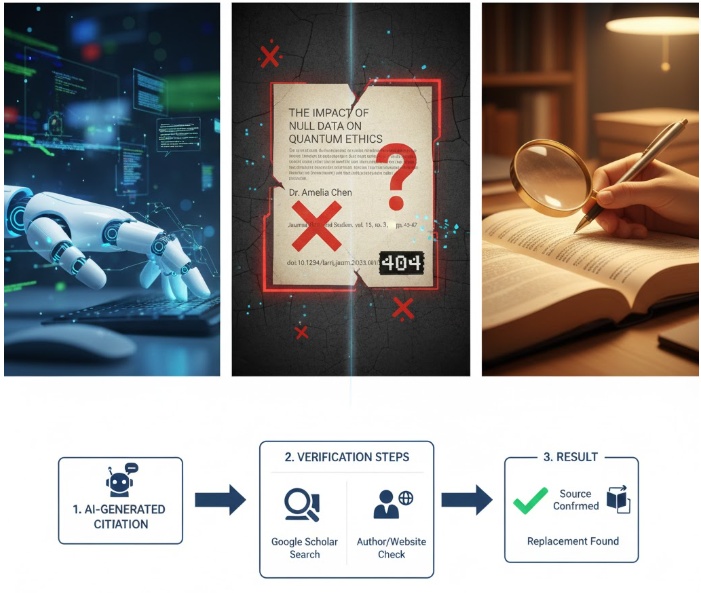
    To understand why AI fails at citations, you have to understand how it “thinks.” AI doesn’t have a giant library of books inside its brain. Instead, it works on probability. If you ask it for a paper on climate change, it knows that the words “Journal of Science” and “Global Warming” often appear together. It might then invent a title like “The Impact of Carbon Fluctuations on Polar Ice,” attribute it to a real-looking name like “Dr. Sarah Jenkins,” and give it a date of 2022.

    To a student, this looks perfect. But to a professor or a Google fact-checker, it’s a red flag. These are called “hallucinations.” The AI isn’t lying on purpose; it’s just trying to be helpful by giving you what a citation should look like, rather than what it is.

    Why Google Cares About Your Citations

    You might wonder, “If my writing is good, why does it matter if the source is slightly off?” In 2026, Google’s ranking system revolves around a concept called E-E-A-T (Experience, Expertise, Authoritativeness, and Trustworthiness).

    When Google’s bots crawl a guest post on a site like GravityWrite, they look at the outbound links. If those links lead to broken DOIs (Digital Object Identifiers) or non-existent papers, the algorithm flags the content as “low quality” or “spam.” If you want to rank on the first page, your citations must be a bridge to high-authority websites. A manual fix isn’t just a way to avoid a bad grade; it’s a search engine optimization (SEO) necessity.

    How to Manually Fact-Check Your AI Draft

    Before you publish anything generated by AI, you need a “Verification Workflow.” Here is how a human editor does it:

    1. The Google Scholar Test: Copy the title of the source provided by the AI. Paste it into Google Scholar. If it doesn’t show up in the first three results, it is likely a hallucination.
    2. The Author Audit: Check if the author is a real person. Many times, AI will combine the first name of one researcher with the last name of another.
    3. The URL Check: Never trust a link provided by an AI. Always click it. If it leads to a 404 error, you need to find a replacement source immediately.

    Using a Citation Generator Machine is a vital step once you have verified the source is real. It helps you organize these verified facts into the correct format without the risk of the AI “guessing” the punctuation.


    Master the Style: APA, MLA, and Beyond

    1. The APA 7th Edition (The Scientist’s Choice)

    APA style is the standard for social sciences. The most common mistake AI makes here is with the “Date.” In APA, the currency of information is everything.

    • Manual Fix: Ensure you have the exact year in parentheses. If the AI cited a “2024” study, double-check that the study wasn’t actually a pre-print from 2023. Also, pay attention to the “Sentence Case” in titles—only the first word of the title and subtitle should be capitalized.

    2. MLA 9th Edition (The Storyteller’s Choice)

    Used mostly in the humanities, MLA is focused on the “Container.” This means if you found an article on a website, you must credit the website, not just the author.

    • Manual Fix: AI often forgets to include the “Database” name (like JSTOR or Project MUSE). When you edit manually, make sure the name of the database is italicized at the end of the citation.

    3. Chicago Style (The Historian’s Choice)

    This is the “Final Boss” of citations. It uses footnotes and a bibliography. AI almost always fails at the numbering system.

    • Manual Fix: If you delete a paragraph in your draft, the AI won’t automatically re-number your footnotes. You must do this by hand to ensure that footnote #4 actually leads to source #4.

    The Ethics of AI in 12th Grade and College

    If you are a student in the 12th grade, you are at a crossroads. Your teachers are likely using “AI Detectors,” but these detectors are often inaccurate. What teachers actually look for is “Human Effort.”

    When a teacher sees a perfectly formatted, verified bibliography, it proves that you didn’t just “copy-paste” from a chatbot. It shows you did the work of a researcher. Using AI for an outline is smart; using it for your facts is a gamble you shouldn’t take. This is why many students use AI to get started and then switch to expert services for the “heavy lifting” of research and data verification.

    Practical Tips for Ranking Your Content

    If your goal is to get this guest post on the first page of Google, remember these three rules:

    • Use Descriptive Subheadings: Instead of “Introduction,” use “Why AI Fails at Citations.” This helps Google understand the “intent” of your writing.
    • Write for the Reader, Not the Bot: Use short sentences. Use “you” and “we.” Make the reader feel like they are talking to a friend who knows a lot about tech.
    • Internal Linking: Link to other articles on the host site. If you are writing for GravityWrite, link to their guide on “AI Writing Tips.” This makes your post look like a natural part of their website, not an advertisement.

    Common Citation Myths Debunked

    • Myth: “If it’s on the internet, it’s a source.”
    • Truth: A blog post by an anonymous author isn’t a scholarly source. Always look for a “.edu” or “.gov” link to give your writing more “weight” in Google’s eyes.
    • Myth: “AI can’t be caught making up sources.”
    • Truth: It is actually the easiest way to get caught. A plagiarism checker might not find the text, but a librarian can find a fake source in seconds.

    The Future: Will AI Ever Get Citations Right?

    The technology is improving. New versions of AI are beginning to use “RAG” (Retrieval-Augmented Generation), which allows the AI to look at a specific set of documents before it speaks. However, even with RAG, the AI doesn’t understand the context of a quote. It might take a sentence out of context to make it fit your argument.

    This is why the “Human-in-the-Loop” model is the future of writing. Use the machine for speed, use the human for truth. This combination is what creates “Page 1” content. It provides the depth the audience wants and the accuracy the search engines demand.

    Frequently Asked Questions

    Why does artificial intelligence frequently create fake references? 

    AI models operate on predictive patterns rather than a factual database. When asked for a citation, the system generates a string of text that looks like a standard reference—often combining real author names with plausible but non-existent titles—to satisfy the user’s request.

    How can I tell if a generated source is real or fabricated? 

    The most effective method is to search for the specific title or DOI (Digital Object Identifier) in reputable databases like Google Scholar or JSTOR. If the work does not appear in professional search results or the link leads to a broken page, it is likely an error.

    What are the risks of using unverified citations in a paper? 

    Using fabricated sources can lead to serious academic integrity violations, even if the error was unintentional. It undermines the credibility of your research and can result in the loss of trust from readers, instructors, or search engine algorithms that prioritize factual accuracy.

    Does using a formatting tool help solve the problem of fake data? 

    A formatting tool ensures that your real, verified sources are structured correctly according to style guides like APA or MLA. However, it cannot verify if the information inside the source is true; manual human oversight remains necessary to confirm that the underlying data is authentic.

    About The Author:

    Sienna Kelly is a dedicated academic researcher and content strategist who explores the intersection of artificial intelligence and human creativity. Representing MyAssignmentHelp, Sienna focuses on bridging the gap between automated tools and expert-led scholarship to help students maintain high standards of integrity in a rapidly evolving digital world.

  • How to Make Your Presentations Stand Out in a Crowded Digital World

    How to Make Your Presentations Stand Out in a Crowded Digital World

    Creating a presentation that captures attention and keeps an audience engaged is no easy feat. Whether it’s for a classroom, a boardroom, or a virtual webinar, the pressure to deliver clear, memorable content can be overwhelming. Many people struggle not just with the content itself, but with how to present it in a visually compelling way that resonates with viewers. In today’s fast-paced digital environment, the stakes are even higher people scroll, click, and multitask constantly, leaving little room for dull slides or cluttered designs.

    Fortunately, technology has evolved to help bridge this gap between ideas and visual storytelling. Modern tools now allow anyone to create polished, professional presentations without spending hours wrestling with design software. For instance, leveraging an AI presentation maker can streamline the process by suggesting layouts, color schemes, and content organization based on your topic. This not only saves time but also ensures your slides feel cohesive and visually engaging, even if design isn’t your strongest skill.

    Start With a Strong Narrative

    Before worrying about fonts, graphics, or transitions, focus on the story you want to tell. Every memorable presentation follows a narrative arc: a clear beginning, a middle that builds on your ideas, and a conclusion that leaves a lasting impression. Think of your slides as scenes in a movie each one should serve a purpose, whether it’s to introduce a concept, provide evidence, or evoke emotion.

    One practical tip is to outline your key points on paper first. This makes it easier to identify gaps, redundancies, or areas that need stronger visuals. Once your structure is clear, translating it into slides becomes less overwhelming, and your audience can follow your message without feeling lost.

    Design With Purpose

    A visually appealing presentation isn’t just about aesthetics it’s about guiding your audience’s focus. Use consistent colors, readable fonts, and high-quality images to reinforce your message rather than distract from it. Minimalism often works best; too much text or too many animations can dilute your core points.

    Consider breaking up complex information with charts, diagrams, or infographics. For example, instead of listing ten statistics in bullet points, use a simple bar graph to make trends immediately apparent. Visual clarity reduces cognitive load and helps viewers retain information more effectively.

    Engage Through Interactivity

    Modern presentations don’t have to be passive experiences. Adding interactive elements, such as polls, quizzes, or live Q&A sections, can transform a one-sided talk into an engaging dialogue. Even small changes, like asking rhetorical questions or prompting short discussions, can increase attention and reinforce key ideas.

    For virtual presentations, tools that integrate multimedia elements like video clips, animations, or embedded links can simulate a more dynamic, in-person experience. Always consider your audience’s context: a corporate team might appreciate a succinct, data-driven approach, while a classroom group could benefit from storytelling and visual metaphors.

    Practice With Purpose

    Even the most visually stunning presentation can fall flat if the delivery isn’t polished. Practice multiple times to familiarize yourself with the flow, timing, and transitions. Rehearsing aloud can help identify awkward phrasing or slides that need simplification. Recording yourself is another useful technique; it allows you to observe body language, tone, and pacing from an audience perspective.

    Feedback is invaluable. Invite a colleague, friend, or mentor to watch your run-through. They might spot areas that confuse the audience or highlight slides that don’t add value. Adjusting based on real input ensures your final delivery feels natural and confident.

    Leverage Real-Life Examples

    Audiences connect with stories more than abstract data. Incorporate case studies, personal experiences, or relatable scenarios to make concepts tangible. For instance, when discussing teamwork strategies, a brief story about a successful project can resonate far more than generic tips.

    Quotes, testimonials, and short anecdotes also add authenticity and credibility. However, ensure these examples are concise and relevant they should enhance your narrative, not derail it.

    Conclusion: Make Every Slide Count

    In an age where attention spans are shrinking, creating impactful presentations requires a balance of compelling content, thoughtful design, and confident delivery. Start with a strong narrative, use visuals strategically, and engage your audience through interactive or relatable elements. Most importantly, practice with intent to ensure your message lands clearly and memorably.

    By approaching presentations as storytelling tools rather than simple slide decks, you’ll leave audiences informed, inspired, and eager to take action. Every slide is an opportunity make it count.

  • Hello world!

    Welcome to WordPress. This is your first post. Edit or delete it, then start writing!